
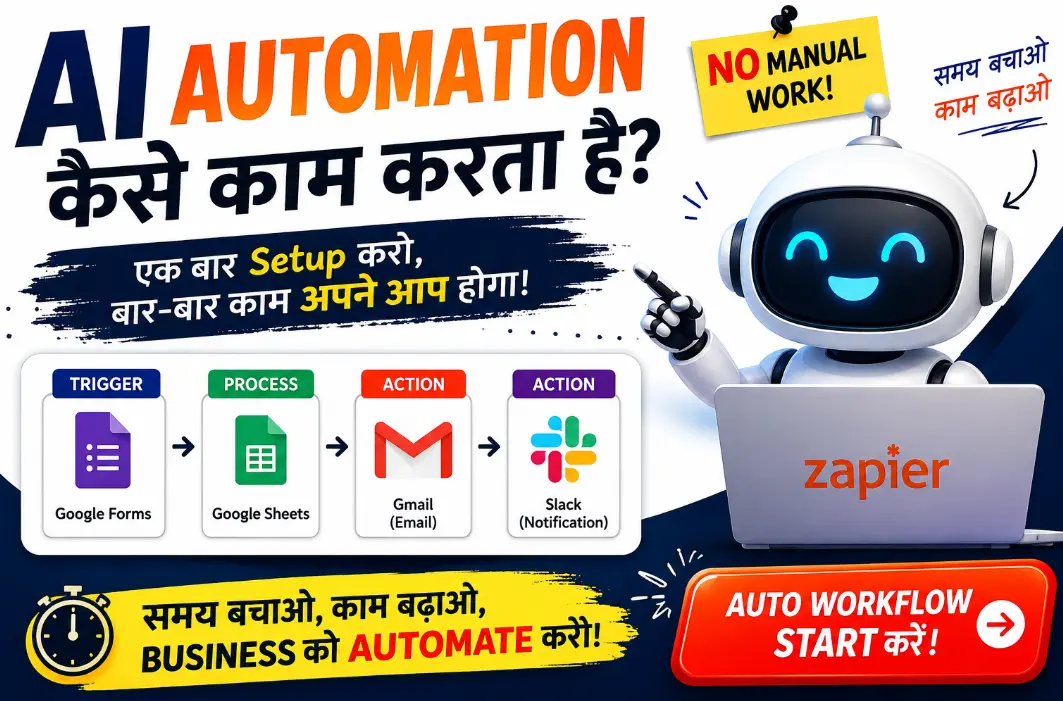
रात के 11 बजे हैं और आप अभी भी वही Excel sheet update कर रहे हैं जो पिछले तीन घंटे से आपका समय खा रही है। यही वो पल होता है जब दिमाग में एक सवाल आता है — “क्या कोई तरीका नहीं है जिससे ये काम खुद-ब-खुद हो जाए?” अच्छी खबर ये है कि जवाब हाँ है। इस article में हम बात करेंगे AI automation tools free में कैसे इस्तेमाल करें, और वो भी बिना एक रुपया खर्च किए।
मैं पिछले काफी समय से अलग-अलग AI automation tools free versions को test कर रहा हूँ — छोटी businesses के लिए, content creators के लिए, और solo freelancers के लिए भी। इस article में मैं आपको वही 10 tools बताऊँगा जो मैंने खुद इस्तेमाल किए हैं या गहराई से research किया है, जो genuinely free में काम करते हैं — सिर्फ नाम के free नहीं, बल्कि actually usable free tier के साथ।
सबसे बड़ी problem जो मैंने देखी है वो ये है कि लोग Google पर AI automation tools free search करते हैं, और उन्हें मिलते हैं वो articles जो सिर्फ international audience के लिए लिखे गए होते हैं — जिसमें WhatsApp automation का ज़िक्र तक नहीं होता, जबकि India में business communication का सबसे बड़ा ज़रिया ही WhatsApp है। इसलिए इस article में मैंने सिर्फ general tools ही नहीं, बल्कि वो tools भी शामिल किए हैं जो Indian users, creators, और small businesses के लिए actually practical हैं। (अगर आप automation के अलावा भी अलग-अलग AI tools explore करना चाहते हैं, तो हमारा 15 Best AI Tools in 2026 वाला honest review भी ज़रूर पढ़ें।)
चलिए अब बिना समय बर्बाद किए सीधा काम की बात पर आते हैं।
Table of Contents
- AI Automation Tools Free क्या हैं — एक Quick Recap
- AI Automation Tools Free Choose करते वक्त क्या देखें
- 10 Best Free AI Automation Tools 2026
- Quick Comparison Table
- आपके लिए कौनसा Tool Best है
- Free में AI Automation सीखने के Practical Tips
- Beginners जो Common गलतियाँ करते हैं
- FAQs
- Conclusion
AI Automation Tools Free क्या हैं — एक Quick Recap
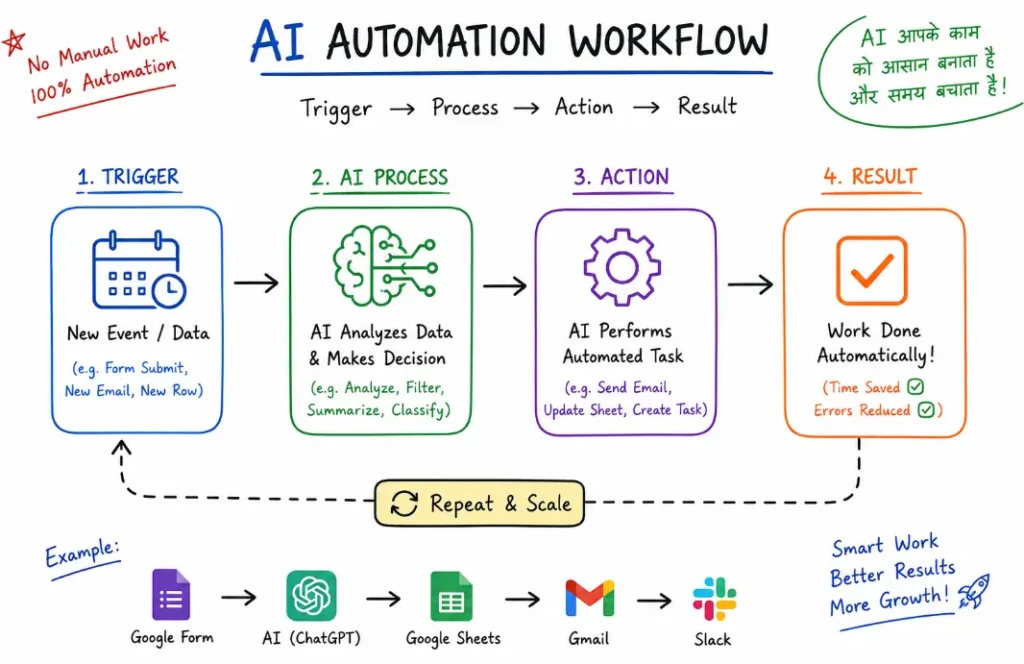
Simple भाषा में समझें — AI automation का मतलब है वो software जो repetitive काम खुद कर दे, और उसमें इतनी “समझ” हो कि वो situation के हिसाब से decision भी ले सके।
जैसे example के तौर पर:
- कोई customer आपको WhatsApp पर message करे, तो bot खुद reply करे
- नया email आए तो वो automatically sort हो जाए
- Google Sheet में data enter होते ही वो automatically CRM में भी add हो जाए
पहले जो automation होती थी वो सिर्फ “if this then that” जैसी fixed rules पर चलती थी। लेकिन अब AI के आने के बाद ये tools context समझ सकते हैं, language process कर सकते हैं, और खुद decisions भी ले सकते हैं।
सबसे अच्छी बात — 2026 में आपको इन tools को इस्तेमाल करने के लिए coding आना ज़रूरी नहीं है। ज़्यादातर tools drag-and-drop interface के साथ आते हैं।
एक और चीज़ जो पिछले 1-2 साल में बदली है वो ये है कि पुरानी automation (“workflow automation”) और नई AI automation के बीच का फर्क धीरे-धीरे मिट रहा है। पहले जो tools सिर्फ “trigger और action” का simple structure follow करते थे, अब उनमें AI steps भी add हो गए हैं — जैसे कोई email आए तो AI खुद उसका tone समझ कर decide करे कि ये urgent है या नहीं, और उसके हिसाब से अलग action ले।
यही वजह है कि 2026 में “automation” सीखना सिर्फ एक technical skill नहीं रहा — ये एक business advantage बन गया है। छोटी businesses जो पहले 2-3 employees hire करती थीं सिर्फ repetitive काम के लिए, वो अब इन tools से अपना समय और पैसा दोनों बचा रही हैं।
AI Automation Tools Free Choose करते वक्त क्या देखें
इस list में जाने से पहले एक important बात समझ लें — हर “free” tool actually usable नहीं होता। कुछ companies “free” का label लगा देती हैं लेकिन असल में 2-3 automations के बाद ही paywall आ जाता है।
मैंने ये tools shortlist करते वक्त इन चीज़ों को देखा है:
- Actual free limit क्या है — कितने workflows, कितने executions per month
- Ease of use — क्या beginner भी बिना tutorial देखे इस्तेमाल कर सकता है
- Integration options — क्या ये WhatsApp, Gmail, Google Sheets जैसे common apps से connect होता है
- India-specific relevance — क्या ये Indian businesses/creators के लिए practical है (जैसे WhatsApp automation, जो यहाँ बहुत demand में है)
चलिए अब सीधा list पर आते हैं।
(अगर आप AI tools को daily use में kaise le sakte hain, ये detail mein samajhna chahte hain, to hamara ChatGPT 30-din use karne ka honest experience bhi padhein.)
10 Best Free AI Automation Tools 2026
1. Zapier — Beginners के लिए सबसे आसान
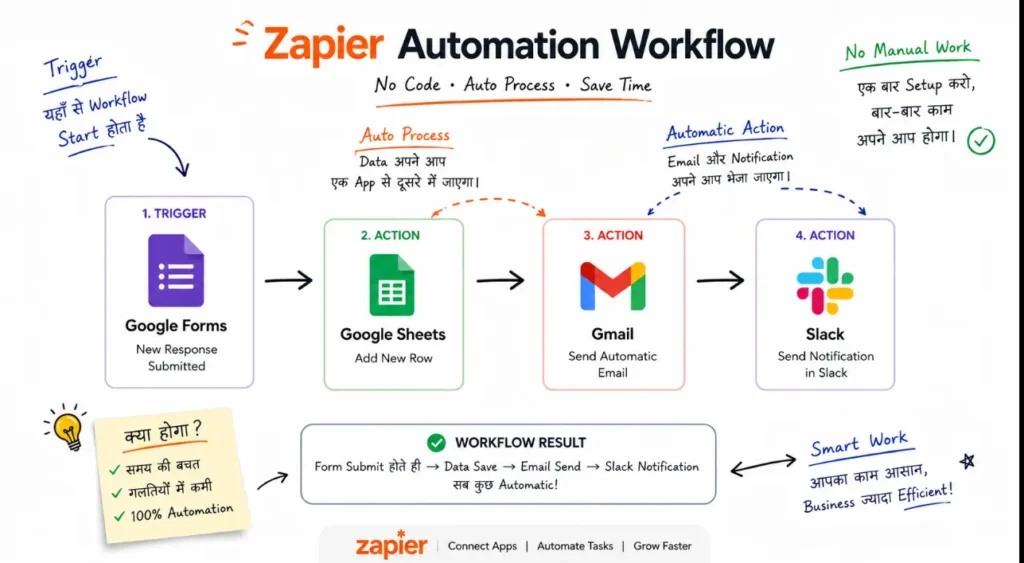
अगर आपने कभी automation के बारे में सुना है, तो Zapier का नाम ज़रूर आया होगा। ये सबसे popular automation tool है क्योंकि इसका interface इतना simple है कि कोई भी 10 minute में पहला automation बना सकता है।
Free tier में क्या मिलता है:
- 100 tasks per month free
- 5 “Zaps” (automations) तक allowed
- 7000+ apps के साथ integration
Best use case: अगर आप छोटी business चला रहे हैं और Gmail, Google Sheets, Slack जैसे tools को आपस में connect करना चाहते हैं, तो Zapier सबसे quick solution है।
मेरी honest opinion: Free tier ज़्यादा scale नहीं करता अगर आपके पास high-volume tasks हैं, लेकिन testing और सीखने के लिए ये perfect है।
👉 Zapier की official website यहाँ visit करें
2. Make (पहले Integromat) — Visual Automation का Powerhouse
Make एक ऐसा tool है जो मुझे personally बहुत पसंद है क्योंकि इसका visual builder Zapier से ज़्यादा flexible है। आप complex workflows को एक canvas पर देख सकते हैं, जैसे एक flowchart बना रहे हों।
Free tier में क्या मिलता है:
- 1000 operations per month free
- Unlimited active scenarios (workflows)
- Advanced logic (filters, routers, conditions) free में भी available
Best use case: अगर आपको multi-step complex automation बनानी है — जैसे “अगर customer form fill करे, तो email भेजे, CRM update करे, और Slack पर notification भेजे” — एक साथ, तो Make best है।
मेरी honest opinion: थोड़ा learning curve है शुरू में, लेकिन एक बार समझ आ गया तो Zapier से ज़्यादा powerful लगता है।
👉 Make की official website यहाँ visit करें
3. n8n — Full Control चाहिए तो ये Try करें
n8n एक open-source tool है, जिसका मतलब है आप इसे अपने server पर self-host कर सकते हैं — और तब ये completely free, unlimited हो जाता है।
Free tier में क्या मिलता है:
- Self-hosted version: unlimited workflows, unlimited executions
- Cloud version: limited trial, उसके बाद paid
Best use case: अगर आप थोड़ा technical हैं या किसी developer की help ले सकते हैं, तो n8n आपको सबसे ज़्यादा value देता है क्योंकि कोई task limit नहीं है।
मेरी honest opinion: Self-hosting थोड़ा technical setup माँगता है (VPS चाहिए होता है), लेकिन अगर आप सीखने को ready हैं, तो long-term में ये सबसे economical option है।
👉 n8n की official website यहाँ visit करें
4. Pipedream — Developers और Power-Users के लिए
Pipedream उन लोगों के लिए best है जो थोड़ा code लिखना जानते हैं या सीखना चाहते हैं। ये visual builder के साथ-साथ JavaScript/Python code steps भी allow करता है।
Free tier में क्या मिलता है:
- 300 credits per day free
- Custom code steps allowed free में भी
Best use case: API-heavy automation, या जब आपको किसी tool का feature चाहिए जो normal drag-drop builders में नहीं मिलता।
5. Activepieces — Open-Source और Beginner-Friendly
Activepieces एक नया लेकिन तेज़ी से popular हो रहा open-source tool है। ये n8n जैसा ही flexible है लेकिन interface थोड़ा ज़्यादा simple और modern है।
Free tier में क्या मिलता है:
- Self-hosted: completely free, unlimited
- Cloud: limited free tier
Best use case: अगर आपको n8n का interface complicated लगता है लेकिन आप open-source का फायदा चाहते हैं, तो Activepieces try करें।
6. IFTTT — Simple Personal Automations के लिए
IFTTT (“If This Then That”) सबसे पुराना automation tool है इस list में, और ये ज़्यादा तर personal use — जैसे smart home devices, phone notifications — के लिए best है।
Free tier में क्या मिलता है:
- 2 applets (automations) free
- Basic single-step automations
Best use case: अगर आप अपने Alexa, Google Home, या fitness tracker जैसे devices को automate करना चाहते हैं, तो IFTTT सबसे simple option है।
Limitation: Business-level automation के लिए ये काफी limited है — सिर्फ personal, simple use के लिए best है।
7. Gumloop — AI-First Workflow Builder
Gumloop नया लेकिन बहुत interesting tool है जो specially AI-powered workflows के लिए बना है। इसमें आप AI steps (जैसे “इस text को summarize करो” या “इस data को categorize करो”) directly workflow में डाल सकते हैं।
Free tier में क्या मिलता है:
- Free plan available with limited credits
- Drag-and-drop AI workflow builder
- API key management की ज़रूरत नहीं
Best use case: अगर आप AI-heavy tasks automate करना चाहते हैं — जैसे content summarization, data analysis, या research automation — तो Gumloop specially इसी के लिए design हुआ है।
8. Wati — WhatsApp Automation का Indian Champion
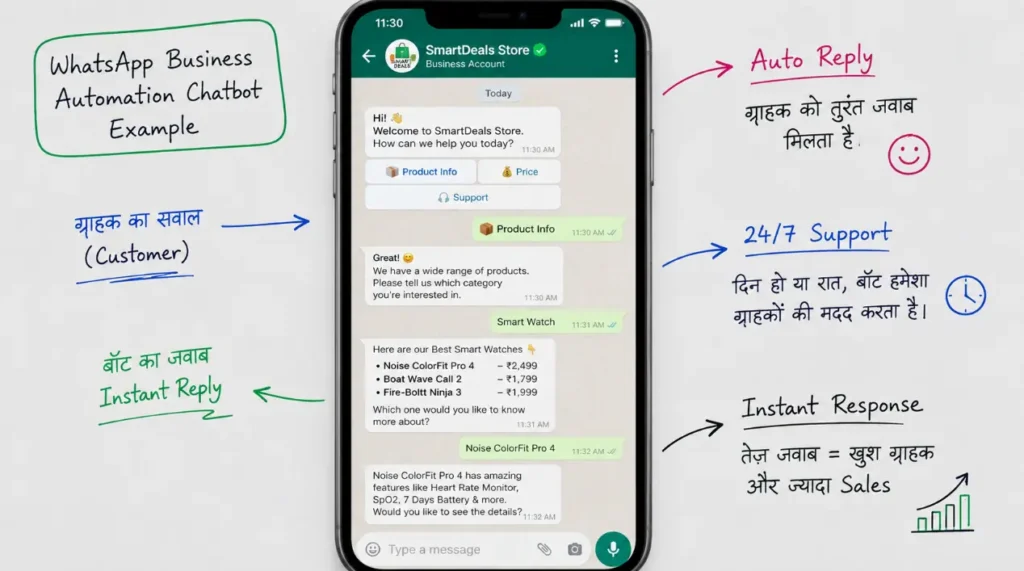
अब बात करते हैं उस section की जो ज़्यादा तर English articles miss कर देते हैं — WhatsApp automation। India में business communication का सबसे बड़ा ज़रिया WhatsApp है, और Wati इसी के लिए बना है।
Free tier में क्या मिलता है:
- Free trial available (limited period)
- Chatbot builder, auto-reply, broadcast messages
Best use case: अगर आप एक छोटी business चलाते हैं और customers के WhatsApp messages का जवाब automatically देना चाहते हैं — जैसे order status, FAQ answers — तो Wati Indian businesses के लिए specially design हुआ है।
👉 Wati की official website यहाँ visit करें
9. AiSensy — Bulk WhatsApp Marketing Automation
AiSensy, Wati जैसा ही एक Indian platform है लेकिन ये ज़्यादा marketing और bulk messaging पर focus करता है।
Free tier में क्या मिलता है:
- Free trial के साथ basic automation features
- WhatsApp catalog और broadcast features
Best use case: अगर आपका goal सिर्फ customer support नहीं बल्कि WhatsApp के through marketing campaigns भेजना भी है, तो AiSensy better fit है।
10. Botpress — Open-Source AI Chatbot Platform
List का last tool है Botpress — एक open-source chatbot building platform जो आपको अपनी website, app, या messaging platform पर custom AI chatbot बनाने देता है।
Free tier में क्या मिलता है:
- Open-source version completely free (self-hosted)
- Visual conversation builder
Best use case: अगर आपको अपनी website के लिए एक custom, intelligent chatbot चाहिए जो FAQs handle करे, lead collect करे, या support दे, तो Botpress flexible और free solution है।
AI Automation Tools Free — Quick Comparison Table
| Tool | Free Limit | Best For | Coding ज़रूरी? |
|---|---|---|---|
| Zapier | 100 tasks/month | Beginners, quick automation | नहीं |
| Make | 1000 operations/month | Complex multi-step workflows | नहीं |
| n8n | Unlimited (self-hosted) | Full control, technical users | थोड़ा |
| Pipedream | 300 credits/day | Developers, API automation | हाँ |
| Activepieces | Unlimited (self-hosted) | Open-source, beginner-friendly | थोड़ा |
| IFTTT | 2 applets free | Personal/smart home automation | नहीं |
| Gumloop | Limited free credits | AI-powered workflows | नहीं |
| Wati | Free trial | WhatsApp customer support | नहीं |
| AiSensy | Free trial | WhatsApp marketing | नहीं |
| Botpress | Free (self-hosted) | Custom AI chatbots | थोड़ा |
आपके लिए कौनसा Tool Best है?
ये सवाल मैंने सबसे ज़्यादा सुना है, इसलिए सीधा जवाब दे देता हूँ:
- बिल्कुल beginner हैं, कभी automation नहीं बनाया → Zapier से शुरू करें
- Complex workflow चाहिए, budget zero है → Make या n8n
- Technical background है, full control चाहिए → n8n self-hosted
- WhatsApp पर customers handle करने हैं → Wati
- WhatsApp से marketing/bulk messages भेजने हैं → AiSensy
- अपनी website के लिए chatbot चाहिए → Botpress
- AI-powered content/data tasks automate करने हैं → Gumloop
Free में AI Automation सीखने के Practical Tips
सिर्फ tool choose करना काफी नहीं है — सही तरीके से सीखना भी ज़रूरी है। कुछ practical tips जो मैंने खुद follow की हैं:
- एक छोटी problem से शुरू करें — पूरी business automate करने की कोशिश मत करें पहले दिन से। एक simple task से शुरू करें, जैसे “नया email आए तो Google Sheet में log हो जाए।”
- YouTube tutorials + tool की official documentation — दोनों का combination best है। Official docs में accuracy होती है, YouTube में practical examples मिलते हैं।
- Free tier की limit track करते रहें — बहुत लोग free tier खत्म होने के बाद confuse हो जाते हैं कि automation काम क्यों नहीं कर रहा। Dashboard regularly check करें।
- Community groups join करें — Reddit, Discord, या Telegram groups में experienced लोग अपने workflows share करते हैं, जिनसे आप directly copy करके सीख सकते हैं।
- एक template से शुरू करें — ज़्यादा तर tools (Zapier, Make) pre-built templates देते हैं। Scratch से बनाने के बजाय पहले template modify करके सीखें।
अगर आप automation ke alawa bhi AI se online earning ke तरीके explore karna chahte hain, to hamara AI Tools se Online Paise Kamane wala complete guide zaroor dekhein — usme bina coding website banakar kamane ka step-by-step method bhi cover kiya gaya hai.
Beginners जो Common गलतियाँ करते हैं
10 साल से blogging और automation tools के बारे में लिखते हुए मैंने एक pattern notice किया है — ज़्यादा तर लोग automation सीखते वक्त कुछ same गलतियाँ repeat करते हैं। अगर आप इनसे बच जाएं, तो आपका experience काफी smooth हो जाएगा।
गलती 1: एक साथ बहुत कुछ automate करने की कोशिश करना
नए लोग excited हो कर अपनी पूरी business का workflow एक दिन में automate करने की कोशिश करते हैं। इससे confusion और errors दोनों बढ़ते हैं। बेहतर है कि आप एक छोटी, repetitive task से शुरू करें — जैसे सिर्फ नए leads को Google Sheet में log करना — और उसके stable होने के बाद ही अगला step add करें।
गलती 2: Free tier की limit ignore करना
बहुत लोग automation set up कर देते हैं लेकिन ये भूल जाते हैं कि free tier में monthly task limit होती है। जब limit खत्म हो जाती है, automation silently रुक जाता है — और उन्हें पता ही नहीं चलता कि customer का message या order miss हो गया। हमेशा dashboard में usage track करते रहें।
गलती 3: Testing के बिना live कर देना
Automation बनाने के बाद सीधा इस्तेमाल शुरू कर देना risky है। हर नए workflow को पहले test data के साथ try करें, देखें कि वो सही से काम कर रहा है, तभी real customers या real data पर apply करें।
गलती 4: सिर्फ एक tool पर depend हो जाना
हर tool की अपनी strengths और limitations होती हैं। कुछ लोग सिर्फ एक tool सीख कर उसी में सब कुछ fit करने की कोशिश करते हैं, जबकि कभी-कभी दो tools को combine करना (जैसे Wati WhatsApp के लिए, और Make बाकी backend automation के लिए) ज़्यादा efficient होता है।
Aur Bhi Padhein — Aapke Kaam Ki Baaki Guides
Agar ye article aapke kaam aaya, to hamari ye related guides bhi zaroor check karein — inme aapko AI tools se related aur bhi practical jaankari milegi:
- 📌 AI Tools Se Online Paise Kaise Kamayein — Complete Guide
- 📌 Best Free AI Image Generators 2026: ये 5 टूल्स Midjourney को टक्कर दे रहे हैं
- 📌 15 Best AI Tools in 2026: I Tried 100+ (Honest Review in Hindi)
- 📌 I Tried ChatGPT for 30 Days: My Honest Review, Results & Verdict
- 📌 Top AI Website Builder Free: बिना कोडिंग वेबसाइट बनाकर ₹1,00,000/Month कमाने का सीक्रेट तरीका
FAQs
क्या AI automation tools बिल्कुल free में इस्तेमाल किए जा सकते हैं? हाँ, इस list के ज़्यादा तर tools का एक genuinely usable free tier है — खासकर n8n और Activepieces जैसे open-source tools, जो self-host करने पर completely free हो जाते हैं।
AI automation के लिए best tool कौनसा है? ये depend करता है आपकी ज़रूरत पर। Beginners के लिए Zapier best है, complex workflows के लिए Make, और अगर आप WhatsApp पर automation चाहते हैं तो Wati या AiSensy सबसे practical options हैं।
क्या बिना coding के AI automation सीख सकते हैं? बिल्कुल। Zapier, Make, Wati जैसे tools completely drag-and-drop होते हैं — इनमें coding की ज़रूरत नहीं पड़ती।
AI automation से पैसे कैसे कमा सकते हैं? बहुत लोग freelance “automation consultant” बन कर businesses के लिए workflows set up करते हैं, या अपनी खुद की business में automation लगा कर समय बचाते हैं जो directly productivity और revenue बढ़ाता है।
क्या WhatsApp automation legal है India में? हाँ, लेकिन एक शर्त के साथ — आपको WhatsApp Business API के rules follow करने होते हैं, जैसे customer की permission (opt-in) के बिना promotional messages नहीं भेज सकते। Wati और AiSensy जैसे official partners इन rules को already follow करते हैं, इसलिए इन्हें इस्तेमाल करना safe है।
कौनसा free automation tool सबसे ज़्यादा reliable है long-term के लिए? अगर आप किसी भी paid plan में switch किए बिना लंबे समय तक free में इस्तेमाल करना चाहते हैं, तो n8n या Activepieces (self-hosted) सबसे reliable हैं क्योंकि इनमें कोई hidden task limit नहीं होती — बस आपको hosting का थोड़ा technical setup करना पड़ता है।
Conclusion
2026 में AI automation tools free सिर्फ बड़ी companies का privilege नहीं रहे — ये अब हर छोटे business owner, freelancer, और content creator के लिए accessible हैं, वो भी बिना एक पैसा खर्च किए। चाहे आप Zapier से simple automation शुरू करें, या WhatsApp automation के लिए Wati try करें, सबसे important step है शुरू करना।
मेरी सलाह रहेगी कि आप एक tool choose करें, एक छोटा सा real problem solve करें, और वहाँ से धीरे-धीरे अपनी skills बढ़ाएं। Automation सीखना एक marathon है, sprint नहीं — और जितना जल्दी आप पहला काम automate करेंगे, उतनी जल्दी आपको इसका real फायदा समझ आएगा।
याद रखें, सबसे successful automation वो नहीं होती जो सबसे complex हो — सबसे successful automation वो होती है जो आपका real समय बचाए और reliably काम करे। इसलिए simple से शुरू करें, धीरे-धीरे expand करें, और हर नए tool को test करके ही अपनी business का core process उसमें डालें।
आपने इनमें से कोई tool try किया है? या किसी specific use-case के लिए help चाहिए? Comments में ज़रूर बताएं — मैं personally reply करता हूँ।

“Namaste! Main Anuj Choudhary hoon, SmartHindiHelp.in ka founder. Pichle 2 saal se blogging, AI tools aur online earning pe kaam kar raha hoon. Yahan jo bhi guides likhta hoon, wo khud try karke, real experience se likhta hoon — taaki aap galtiyan na dohrayein jo maine ki thi.”